Skip to content
View in the app

A better way to browse. Learn more.

Bedlington.uk

A full-screen app on your home screen with push notifications, badges and more.

To install this app on iOS and iPadOS
  1. Tap the Share icon in Safari
  2. Scroll the menu and tap Add to Home Screen.
  3. Tap Add in the top-right corner.
To install this app on Android
  1. Tap the 3-dot menu (⋮) in the top-right corner of the browser.
  2. Tap Add to Home screen or Install app.
  3. Confirm by tapping Install.

Contributor Leaderboard

Popular Content

Showing content with the highest reputation on 28/11/17 in Posts

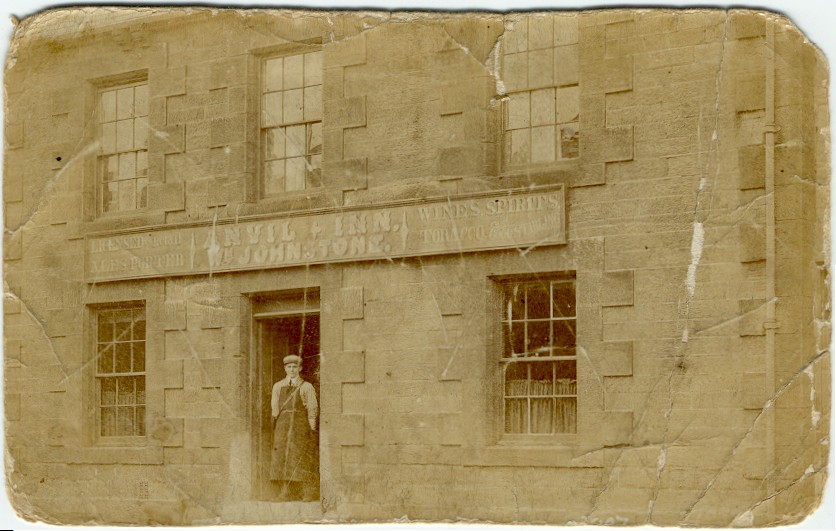
  1. Hi I have attached a photo of the Anvil Inn. My Great Great Grandfather, William Johnstone was the landlord there 1901 for a few years. Does any one any more photos or information about this Inn? the man in the photo could be my grandfather, died 1917 WW1
  2. 1 point
    I know what happened; logged back in on my mobile via Facebook. I don’t remember ever setting up an account in my name! Rest assured, they are both me!!

Account

Navigation

Search

Search

Configure browser push notifications

Chrome (Android)
  1. Tap the lock icon next to the address bar.
  2. Tap Permissions → Notifications.
  3. Adjust your preference.
Chrome (Desktop)
  1. Click the padlock icon in the address bar.
  2. Select Site settings.
  3. Find Notifications and adjust your preference.