Contributor Leaderboard

Popular Content
Showing content with the highest reputation on 30/01/18 in Posts
-
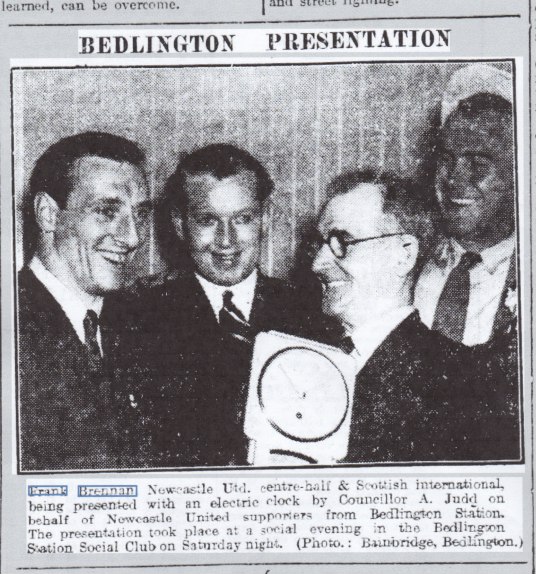
1 pointWhilst doing some research I found this photo in a local newspaper from 1950 and have summarised what was reported. Football Fans from Bedlington Station have formed a Newcastle United Supporters Club, so that they can charter buses for all home matches and certain away games. Ninety of these ardent United Supporters made the decision when they attended a “presentation supper” in Bedlington Station Social Club. Frank Brennan the Newcastle United and Scotland international was invited to be the guest of honour. Brennan was astounded when he was presented with an electric clock, as a thank you for his time. Whilst he protested, saying he did not deserve the gift, the crowd chanted “Good Old Frankie”. The Chairman of Bedlington Station Social Club, Coun. A. Judd chaired the meeting and when the suggestion to form the Supporters Club was put to the vote there were only 3 hands against the proposal. It was revealed that these 3 were actually Sunderland supporters and their stand was “howled down” by the other 87 attendees. In accepting the gift, Frank Brennan said he was bewildered at the gesture, but still claimed he had done nothing to deserve it. Later, he sang solo, to the delight of the supporters. I doubt if you could get any of the current NUFC to leave their homes on Darras Hall and attend such a function.
 1 point
 -
1 point