Skip to content
View in the app

A better way to browse. Learn more.

Bedlington.uk

A full-screen app on your home screen with push notifications, badges and more.

To install this app on iOS and iPadOS
  1. Tap the Share icon in Safari
  2. Scroll the menu and tap Add to Home Screen.
  3. Tap Add in the top-right corner.
To install this app on Android
  1. Tap the 3-dot menu (⋮) in the top-right corner of the browser.
  2. Tap Add to Home screen or Install app.
  3. Confirm by tapping Install.

Contributor Leaderboard

Popular Content

Showing content with the highest reputation on 25/09/16 in Posts

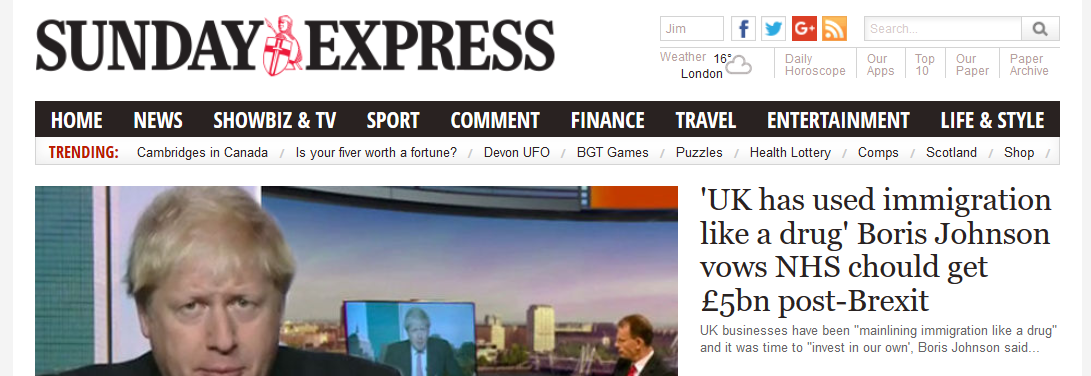
  1. ...or even the Guardian, but the MAIN headline of the Sunday Express HOME page: It's like spelling checkers aren't built in to practically every bit of WP software these days! That's only the start; I hardly get to read any substantial piece where I don't have to reread a sentence several times to try to figure out what the writer intended to say.

  2. Had me laughing as well but I wasn't allowed to "give reputation".
  3. This had me giggling, well spotted!

Account

Navigation

Search

Search

Configure browser push notifications

Chrome (Android)
  1. Tap the lock icon next to the address bar.
  2. Tap Permissions → Notifications.
  3. Adjust your preference.
Chrome (Desktop)
  1. Click the padlock icon in the address bar.
  2. Select Site settings.
  3. Find Notifications and adjust your preference.