


Contributor Leaderboard
-
1Points6,990Posts
-
Rigger
Members1Points119Posts


Popular Content
Showing content with the highest reputation on 11/12/18 in Posts
-
1 pointBradford I may have some information on your family. Not sure what you have. Also I have found a family tree with your family on. How would you like this sent?1 point
-
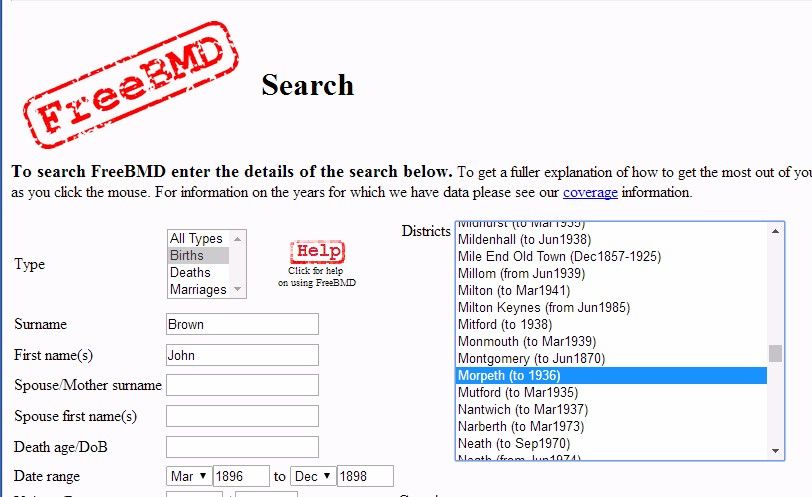
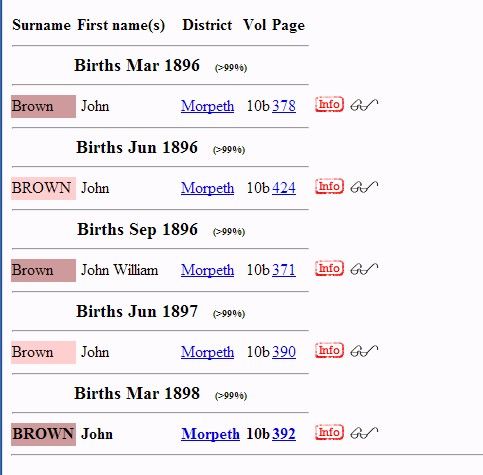
1 pointThe photos are easy Brad - the old ones of South Row are posted on the Bedlington Facebook groups - Bygone Bedlington & Bedlington remembered. Both are closed groups so non members are unable to view the postings etc. Can't help you with any info on the Brown family. I'm not into genealogy. There is a free web site, called FreeBMD that many use to track down relatives. Web address is https://www.freebmd.org.uk/ This is a very straight forward site that doesn't direct you to any other historical records, just the Biths , Marriages & Deaths records. The Registrars office for Bedlington in the 19th and early 20th century was Morpeth, Northumberland. A simple search on the Free BMD site :- returns the basic info :- and from that info you can request a copy of the relevant certificate from the registrars office - used to be just under £10 sterling per copy.
 1 point