


Contributor Leaderboard
-
2Points6,992Posts

Popular Content
Showing content with the highest reputation on 29/08/26 in Posts
-
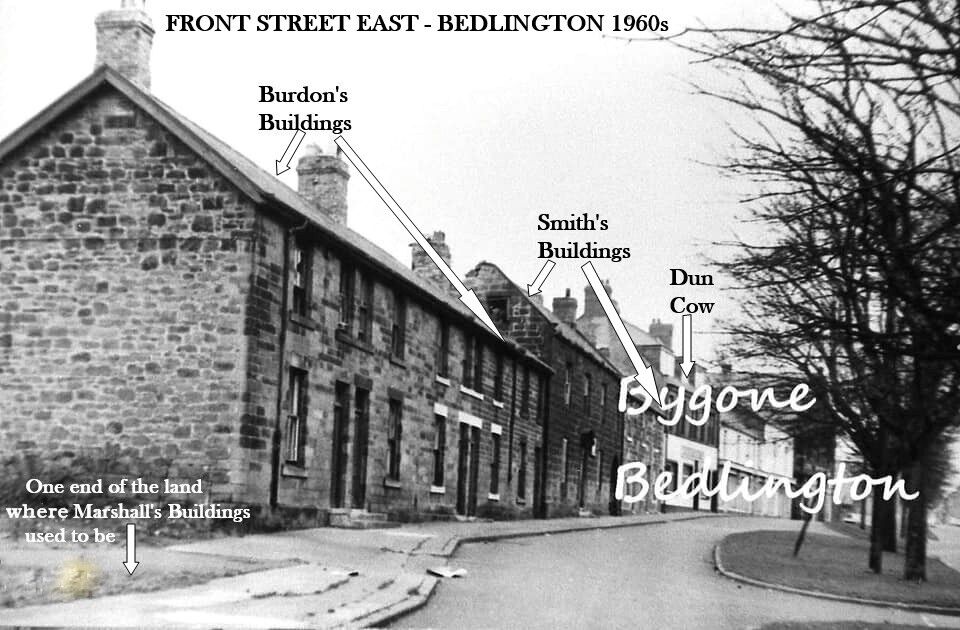
The info on @John Fox (foxy)'s photo updated to fit it with @Canny lass's info.
 1 point
 -
@Canny lass I agree with you. I know many of the Buildings housed numerous families in just a couple of rooms each and whenn I first labelled the photo I was just speculating. It was only when I enlarged that map Michael Myers posted and it showed how the rooms/houses were allocated that I doubted what I had done to the photo. Knowing you would delve into the census etc. I was waiting for you to view all info above😊and as expected you have come up with what I would say was concrete proof of the location of the 3 sets of Buildings👍. I should get to my old PC and software tomorrow and I will correct my labelling on Foxy's photo just to point to Smith's and Burdon's Buildings and also add - ' Marshall's Buildings used to be here' pointing at the ground. I will also update the Bygone Bedlington posting of your findings👌 Thankyou1 point