

Everything posted by Alan Edgar (Eggy1948)
-

From the album: Cambois Infant / Junior School
-
From what you have commented am I right to assume you have viewed the albums in the Gallery - Netherton/Nedderton old photos - Netherton/Nedderton old photos 2 - The End of Netherton Colliery - Netherton Colliery Railway Engine 1970 - Scotts of Netherton & Netherton Colliery Band ?
-
Have you seen this video @timeslip1 -Footage of Netherton Colliery Village 1970 to 1973 - posted by Damian Robson.
-
 No 3 35 & 36 = Johnny & Elizabeth Wilson.
-
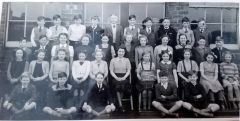 No 9 updated to Jimmy Bewick ?
-
 No 1 & 6 updated.
-
 Nos 10 & 25 added, with ?
-
 Christian names added to Nos 6 & 10
-
 No 5 - Arthur Keenlyside ?
-
 No 15, not 16, = Florrie Randall (not Randle).
-
 Photo from Pat Robinson and names from Colleen Spencer.
-
From the album: Cambois Infant / Junior School
-
 Names from No 11 - Simon Williams.
-
From the album: Cambois Infant / Junior School
-
 Names from Barrie Greatrex.
-
From the album: Cambois Infant / Junior School
-
 Names updated by Joan Drysdale, nee Potts, = No 23.
-
 The photo is not from 1967 - 1967 is the year this lot were born.
-
Photo from Christine Burnett & Lyn Robertson. No 29 = Lyn's mother - No 16 is Maureen Graham's mother = Florrie Randall
-
White van man must have seen it @Vic Patterson - he' hasn't moved since it was last seen

-
 Whilst searching for other stuff about Netherton I noticed a comment, posted by Graeme Ogle, against this image I must have missed. The Lady with the 'X' on her apron is Mary Rochester's mother Jane Alsop.
-
Post your comment for Peter to see and he replied with :- Peter Quinn Alan Edgar I am peter the son my dad would of been 81 back in January past he died back in 97 I remember Geordie kinsman myself lovely fellow I was also at bates myself started in 76
-
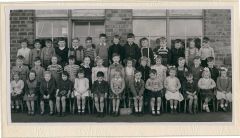 Original photo from Brian Turner and 'photoshopped' by John Ashford. Names from Ray Mullen, Maureen Webster, Alan green and Janet Madine (nee Holland) = No 34.
-
From the album: Cambois Infant / Junior School
-
 Photo posted by John Edward Smith and all the names from Pat Robinson nee Towers = No 31.