



Skip to content
View in the app

A better way to browse. Learn more.

Bedlington.uk

A full-screen app on your home screen with push notifications, badges and more.

To install this app on iOS and iPadOS
  1. Tap the Share icon in Safari
  2. Scroll the menu and tap Add to Home Screen.
  3. Tap Add in the top-right corner.
To install this app on Android
  1. Tap the 3-dot menu (⋮) in the top-right corner of the browser.
  2. Tap Add to Home screen or Install app.
  3. Confirm by tapping Install.

WELLNESS WEEK

Exciting News:
We have 4 days of activities completely free of charge - there is something for everyone. So don't be shy! 
If you've never tried your hand at a craft or want to get fit but don't know if it will suit you come along!
If you want to boost your confidence, been out of work for a little while and don't know what or how to write a CV come along!
If you need advice on benefits or how to upload your CV to Universal Credit or are you in a bit of debt and need some advice? Come along!
If you want to find out how the Bridge Project can help you, come along!
If you are looking for work - come along!
If you want to chill after all of that then come and Chill with Jill. Just Come along - it's FREE!!!!! and open to everyone - regardless of age!
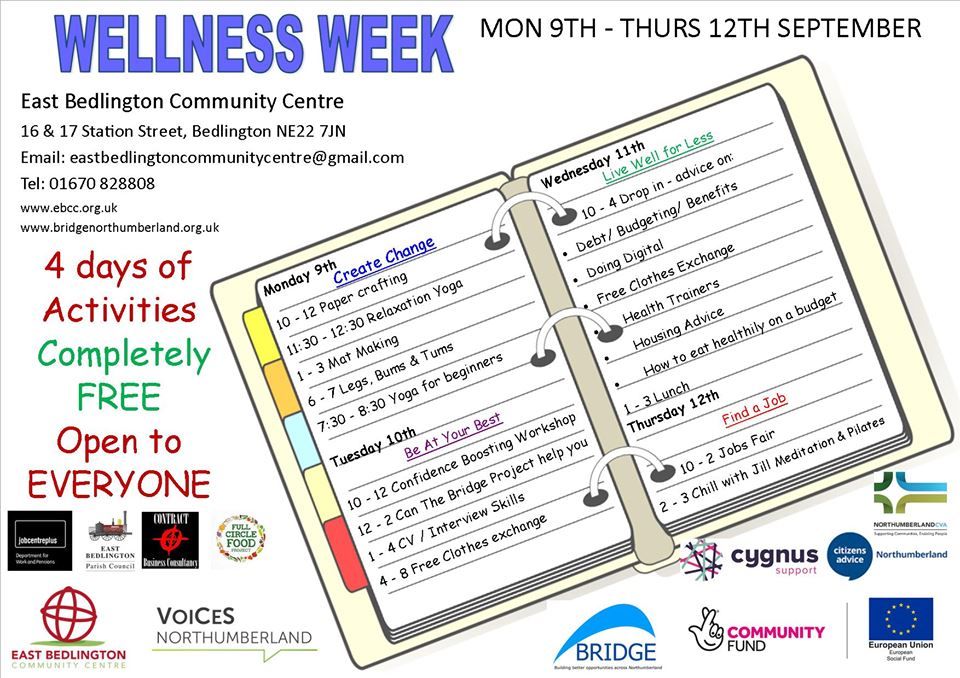
Wellness Week.jpg

Recommended Comments

There are no comments to display.

Create a free account or sign in to comment

Account

Navigation

Search

Search

Configure browser push notifications

Chrome (Android)
  1. Tap the lock icon next to the address bar.
  2. Tap Permissions → Notifications.
  3. Adjust your preference.
Chrome (Desktop)
  1. Click the padlock icon in the address bar.
  2. Select Site settings.
  3. Find Notifications and adjust your preference.