Contributor Leaderboard
-
Malcolm Robinson
Moderators1Points6,416Posts -
Barton Lad
Members1Points70Posts


Popular Content
Showing content with the highest reputation on 24/10/10 in all areas
-
1 pointIf anyone else would like to contact this firm and leave Mr Collins a message…….. Pity it doesn't have a drop down menu for 'a couple of million Geordies want to have a word with you bonny lad! Pick a winda!' http://www.directski.com/go/contactus?session=906e87e5c32b9963ecd5fd74d25b541d1 point
-
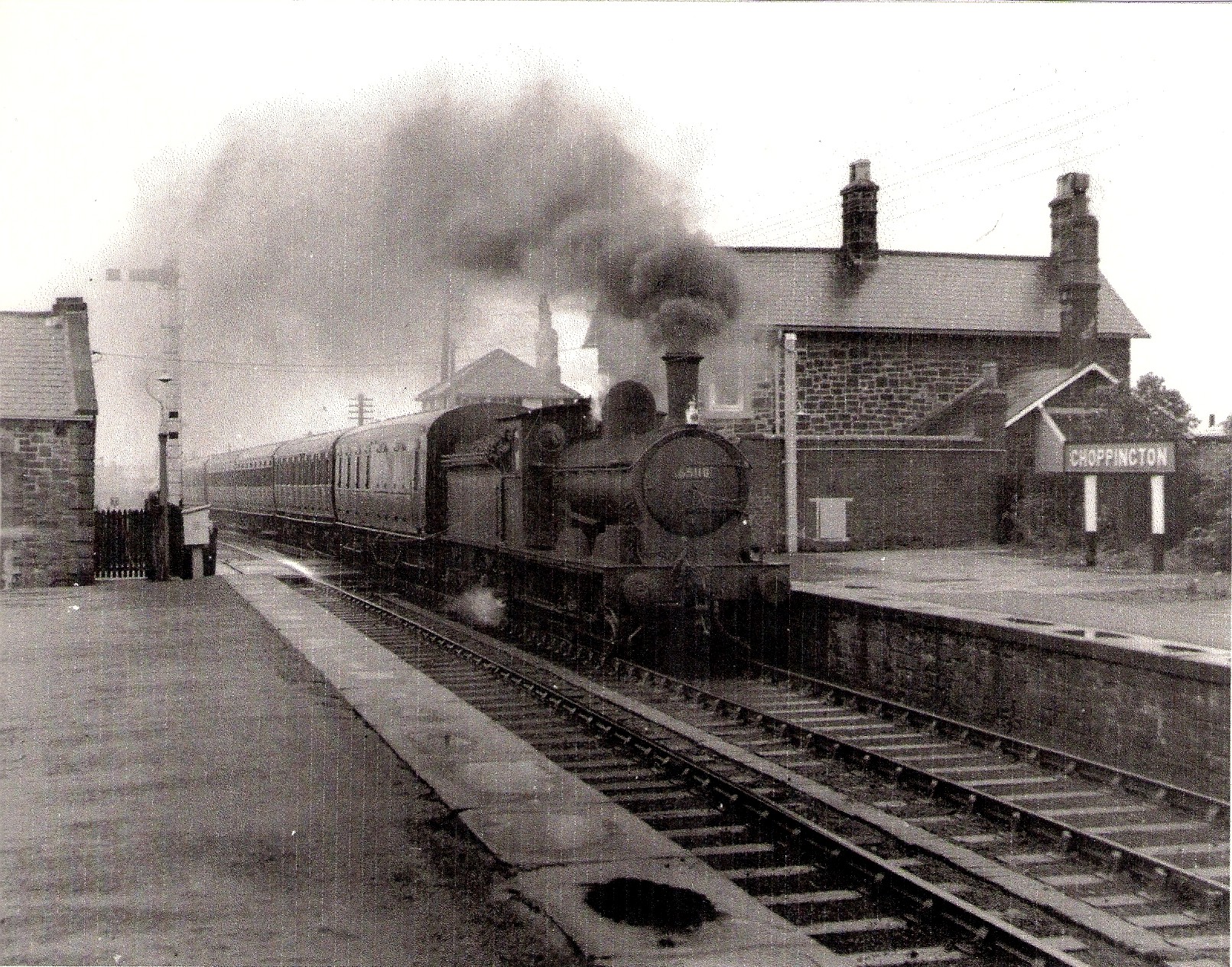
1 pointHi, just discovered this photograph which was taken about 1950. The train was a miners Picnic day special, which was travelling to Morpeth. The station, which is now all gone, was at the top of the bank.(opposite direction to the speed camera of course) The track is also now a single track. The building on the left was definately the ticket office, whilst I think the building on the right belong to the railway, maybe the station master. I suspect these buildings were there when the photo below was taken.
 1 point