Contributor Leaderboard
-
Cympil
Members1Points2,993Posts -
Barton Lad
Members1Points70Posts


Popular Content
Showing content with the highest reputation on 12/12/10 in all areas
-
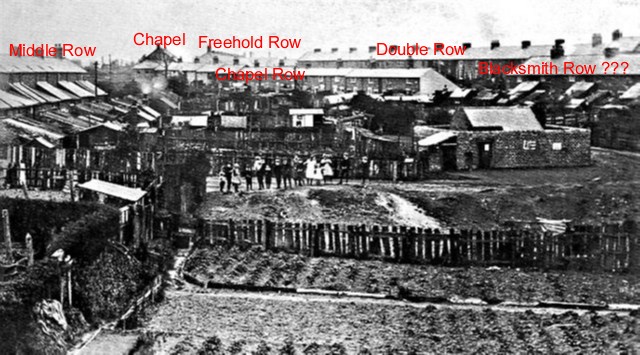
1 pointCympil, I have annotated the photo with the names of the rows. Office row was pulled down 1968/69. I think Blacksmith row was demolished 1930's. The other "rows" were Railway Row, Victoria Row, Stone Row. The photo must have been taken about 1900, due to the elevation from the pit rail track. It must have taken a quite bit of effort to take this photo. I wonder what the party of school children are looking at ??? It looks like a bomb crater. Also what is the building to the right ? It looks like a prison, maybe its a pig cree. I am sure the photo holds some interesting facts.
 1 point
 -
1 pointA couple of photo`s i`ve came across regarding Barrington. How Barrington used to look and Office Row1 point