


Contributor Leaderboard
-

threegee
Administrators1Points4,445Posts -
dunlinds
Members1Points4Posts -
Jayne Delancey
Members1Points1Posts

Popular Content
Showing content with the highest reputation on 19/02/17 in all areas
-
1 pointThe tale of the gray lady was around when I lived in Hartford in the sixties,..jayne delancey(nee fielding)scary huh!!!1 point
-
I can confirm that this was The Oddfellows Arms by virtue of having handled the original deeds myself at some time in the mid 1970's.1 point
-
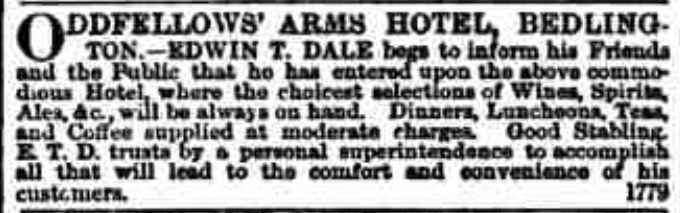
Re Oddfellows Arms Hotel: My Great great Uncle - Edwin Taylor Dale - took over the hotel in 1867, as per attached snippet from Newcastle Daily Chronicle. This doesn't show the location of the hotel, but I found a photograph from Northumberland archives dated from 1974 which suggests that the 'corner' building was The Oddfellows Arms.1 point