


Contributor Leaderboard
-
Bot
Moderators1Points1,669Posts -

webtrekker
Members1Points560Posts


Popular Content
Showing content with the highest reputation on 27/06/17 in all areas
-
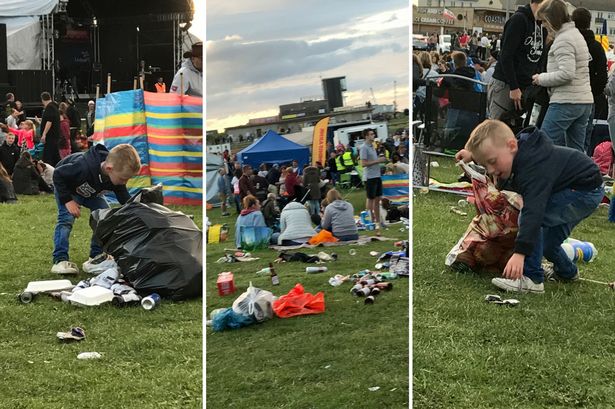 Thousands turned out for the fourth Northumberland Live festival at Blyth at the weekend and quite a few left their litter behind them - much to the dismay of one little boy. Five-year-old Oliver Jackson, of Blyth , immediately set to work collecting the abandoned cans, chip trays and sweet and crisp packets you can see in his grandma’s photographs. Proud gran Alyson Young said: “On Saturday evening after the Blyth festival was finished and people were leaving, my grandson, Oliver Jackson, aged five, was watched and admired by many people as he started to clear up the filth and debris that other people had left. “He was so upset by the amount of litter and mess that adults had left lying in ‘his park’ that he took himself off and found a carrier bag and started to clean up. He said ‘It’s not acceptable to have all this rubbish - why have they done this to my park?’ “People looked on in awe of this little boy and started to give him money for his efforts. As if that wasn’t good enough - he then went on to say, ‘I think I’ll give this money to the poor children’ because they don’t have what he has. “He went and asked for a bag from an organiser and was picking up everything, including a four-pack of lager which had been left behind, and was dragging it along behind him.1 point
 -
1 pointNice idea, but I've heard that the service is often delayed due to shoots on the line!1 point