



Everything posted by Alan Edgar (Eggy1948)
-
 high pit wilma :- Today is Sunday 16-1-2011,and a few more unreported disasters,in China,Russia,and other countries,have taken place,just like it does every week that goes by.....so important is the life of the miners....and their widows..and families left behind...... I heard a news report [in English],on Short wave radio,["Voice of China" radio station..], that 3000 miners are killed,and many more badly injured,or missing underground,due to roof falls etc,EVERY YEAR! ......AVERAGE OF 60 EVERY WEEK GOD SENDS.....AND DOES ANYBODY CARE.....? NOO!,.....a notice nobody has come on here ti accuse me of being slanderous ti thatcher -thi- hatcheter,or any other of her cronies.....cos i speak the truth!! Dr. Drewboy :- i heared stories about them... really hard men! high pit wilma :- Hi Drewboy! My heart goes out to any miner in the world,and thier families,when disaster strikes them,as it does to mankind generally,but i have an affinity to the men who are the salt of the earth,and get no thanks for doing a uniquely dangerous job.
 -
high pit wilma :- It is now 26 -11-09, and 108 miners have been reported killed in a massive gas explosion,in a Chinese coalmine,550 metres below ground, unreported number of injuries to the rest of the 500 miners who were underground at the time of the blast. NO COVERAGE ON BRITISH TV THAT I KNOW OF,NOBODY IN THE STREET TALKING ABOUT IT,LIKE THEY DID ABOUT M.P.'S EXPENSES SCANDAL......... MONEY IS MORE IMPORTANT THAN MINERS LIVES....ANYWHERE IN THE WORLD............. morrisoxford61 :- I am stunned, I never realised nor even thought about the fact that the mine went outside of the land 10 miles out to sea thats amazing, once you were at the bottom of the shaft how did you get to the pit face/ sorry to ask a daft question, but I have no idea, , if you kept going you would have ended up under belgium? what did these men inspect for on the shaft, is it some form of movement or cracking? and how long did it take to go down and check the shaft high pit wilma :- Hi Morris Oxford,i should have been called MG.MAGNETTE MK1V..! [ONE OF THE LOVIEST OLD CARS I EVER HAD..A 1963 ONE...] Anyway,the shaftsmen had,by law,to examine the shaft walls,for any signs of side pressure causing damage to it,also they had to check the condition of everything in the shaft,i.e.the "skeets"..[cage guide rails,which keep the two cages held in their respective positions,so they don't crash,in the middle of the shaft,like they often did at Choppington "B" pit,in the old days..] They had to apply thick black grease to the skeets,regularly,examine pipework,which carried mine water to the surface,and electrical cables,for any obvious signs of damage. They also had to transport unusually bulky or large bits of machinery,or heavy girders,down the mine,by "slinging" them UNDER the cage on chains,in the old days,they slung the pit ponies under the cage in harnesses to take them down,or bring them up to the surface! The shaftsmen,could be on top of the cage for a whole shift,if the job needed them to be,for hours and hours,that's why i wouldn't have the job for a proverbial "gold pig"..[northumbrian miners slang term!] They have a lot more duties than i have space for here. We faceworkers used to get a "manriding locomotive " set,inbye,for a few miles,then jump onto a conveyor belt,for a couple more miles,walk a couple of miles,another "battery electric" loco set,for another mile or two,walk a bit more......then when you got inbye,you were knackered,before you started,but the job didn't magically go away...it still had to be done,regardless how fatigued you were...mining toughens you up...[this was to get into the Plessey seam at Bates pit,which was over 12000 metres to the last officially designated "meeting station"..where the deputy of the district you were in would record your names,and tally numbers,in a book provided by the government,[mines and quarries act].,before you actually went onto the coalface. The 3/4 Drift,where these pics were taken,was about 4 miles inbye,maybe a bit more,and we had a 2 mile ride in on a deisel loco manriding set,then shanks pony,the rest of the way....![soaking wet,cold,depressing,you just wanted to go back home to your nice warm bed,that you had just left,at 12-0 midnight...........] Do you think i was a "greedy miner",like the tory press used to print in their gutter papers..........?...!! Latest news from China...25 miners presumed dead,missing,search goes on for more,over a 150 being treated for malnutrition ,after being found in an emaciated state,having survived by eating the bark off the pit wood timber props,and drinking filthy mine water.........ANOTHER DISASTER IN CHINA,UNREPORTED BY OUR GOVERNMENT. At least we DID have the protection,[in latter years..i.e.,of the mines and quarries act...] My heart and soul goes out to those guys,and their famiies who are left,in that Country....especially when we are importing "cheap"[?] coal from there...and we left 60 million tons of virgin clean coal,under the sea,at Bates pit,alone...!![ today is 14-4-10] morrisoxford61 :- NO I never thought you were greedy miners in fact a friend of mine is a policeman near retirement and he had to go up for those big protests talking about it one day he told me how difficult it was to police because he respected the miners and his job was safe by comparison he made a good few friends their I think like so many things in goverment back handers were involved, masonic practises, golf course meetings etc thats how its done they shut down the pits to buy it in from overseas and get a backhander or a good pension from it or act as consultants what they shouyld have done in the miners strike was to ask the general public to come up and visit you and see what it really was like, that would soon have swayed opinion I wonder if any one will ever buy a mine adn run it privately, would be amazing to bring them back to life at a profit after all cheap coal from china still has to get to this country and that costs money high pit wilma :- Aye,Morris,if ever they do open up the existing mines,like Bates,people will stand in awe,at the amount of machinery and equipment,like all the hundreds of miles of really heavy duty,6,600volt armoured copper cables,massive transformers,sub-stations full of banks of heavy switchgear,miles and miles and miles of conveyor belts,haulers,miles of steel hauler ropes......i could go on and on...[as i usually do!],because it makes me very angry,every time i think of the hundreds of millions of pounds worth of gear left in all our nation's pits,not just this one,by a greedy selfish uncaring government,who i am sure,were really acting in their own interests. Thanks for your comments !
-
BigLoada (deleted) 9y Hahaha! A "gold pig". Classic Northumberland phraseology man. I love it. BigLoada (deleted) 9y I pity these poor English folks here now you have been let loose on Flickr!! high pit wilma :- Howw! If thi waant photo's doon a geordie pit,thiv gotta expect geordie twang as weel...cos aam an aad geordie pitman...!! ER....sorry folks, just went on a bender there.....!! BigLoada :- Just noticed the title. For anyone not from Northumberland, "Marra" means "mate"! billsharp :- I knew a shaftsman when I worked at Cambois who said "If I go over the edge just cut the chain, because I'll be dead before it tightens!" high pit wilma :- Hi Bill,yeah,i wouldn't have the job for a gold pig...! Bill Carnaby :- Done this job mate -first time you are really scared -then your just thankful you could do it again! Great memories high pit wilma :- Thanks Bill! Yeah,i knew a lovely natured lad who was a shaftsman,at the auld pit,in Bedlington, i was carrying on with him at the start of our shift,then i went inbye to the coalface.About 4 hours later he died in the shaft,due to a tragic accident. He had the biggest funeral that i have ever seen,bar none. Everyone,including management,and engineers,etc,were there ,cos he was so well-liked throughout the pit. When i think back about accidents like that,it brings it home to the dangers miners faced,but never thought about during the course of their daily lives. Coalmining has a lot to answer for.............
-
From the album: Bates Pit by High Pit Wilma
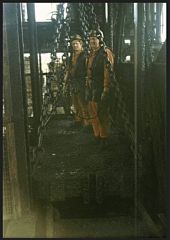
high pit wilma :- The shaft had to be examined down the full depth,every 24 hours,and was done in night-shift [5-0pm till midnight shift ] Any maintenance work was also carried out in this shift ,by these two men.note their safety harnesses which they attached to the cage chains....they are standing on top of the cage..with a thousand foot drop over the edge! ALL OF US UNDERGROUND,DEPENDED UPON THE SHAFTSMEN BEING UTTERLY RELIGIOUS IN THEIR WORK....![looking back noo,aam wondering hoo many o' thi lads actually realised,and appreciated, the importance of the shaftsmen...] frazerweb PRO :- Great shot guess these shafts were deep high pit wilma :- Hi! This shaft was one thousand feet deep,down to the sump level,i.e. the level below the shaft opening into the roadway at the shaft-bottom. The main pumps for pumping water out of the pit to the surface,called the shaft pumps,were submerged under the water,down in the sump.[These were huge pumps,mind, to give the necessary head of water of over a thousand feet,they had to be robust...!] The shaftsmen were devils disciples...! [if you know what i mean!] I worked underground for nearly thirty years,in really rough conditions, 10 miles out under the north sea,but i wouldn't have their job for a gold pig...!! Glad you like my shots! -
 BobbyG25 :- Hi HPW Interesting to here about the explosive side to your job. I remember testing the Beethoven exploders in the workshops at Bates. We used to use little yellow caps to test them. In the gold mines they used to fire a level at a time and only when the mine was totally clear. Sometime you could be out shopping and you would feel the shots going off. and that was from 4500 ft below you. I worked a good bit on the winders at Bates and the shafts, went down inspecting them. interesting to see this photo of the Baths, I used to change next to Ronnie Campbell, knew his brother skinny Campell, wonder how he is doing these days. The gold mines had a lot of Methane in them so I was surprised to be asked to take some sausages down one morning for a Barbacue........... yes and there right before my eyes down at 4500 feet we had a barby and a smoke.......wonder if its changed. Better go now, take care HPW....... high pit wilma :- Bobby, those were thi days my friend,we thought they'd never end, we'd cut and drill....and fire every day,we'd catch thi loco oot,off ti thi baths we'd shoot,those were thi days,oh yes those were thi days....la la la laaaaa,la la,...........!! [it cums natural ti a brilliant muso like me......!....mind,a DID try ti keep me day job,till yon b.............ugga,med sure a wadn't gaan doon a pit ever again,cos it was a working man I was,and I worked down und...er..ground......!!!!!heh heh!] Are yi still oot there Bobby? Ye probably dae knaa that Ronnie Cambell has been thi Blyth valley M.P. for thi last 20 years..[a think it'll be 20 years...] A didn't knaa his Brother. Keep a hauld ,Marra!
 -
skida :- My good lady's dad, the late Frank Herron was a banksman at Bates, after moving from Crofton, and we have really enjoyed looking through you photos Wilma. Thanks. high pit wilma :- Hi skida,noo...!.....it's a smaall world,as we aal knaa,but did Frank live at Hollymount Square Bedlington by any chance? Many thanks for your kind comments,and i am pleased you had pleasure and nostalgic memories from seeing them. Cheers! skida :- Hi Wilma. Frank was a Newsham Man and as far as I know never lived in Bedlington. His daughters used to have a great time going into Bates' canteen where the dinner lady spoiled them. I am no fan of Thatcher and it was interesting reading your comments and getting an insight of the miner's perspective. I doubt this country will ever recover from the loss of heavy industry, especially in the North East, which resulted from her government allowing the fat cats to invest profits made here to be invested in sweatshops in the third world. Cheers BobbyG25 :- Hi Wilma I was at Bates between 1964 and 1972. Spent most of my time in the Plessy seam on mech faces. Served my apprenticeship as an electrician then stayed on till the strike then went out to South Africa, gold mines. That was an eye opener. Never mind I'm retired now and can spend my time thinking of those wonderfull times crawling along the face with water every where and dust coming off the machines especially if they where cutting through a fault. Those where the days !!!!!!! theres a song there some where .............. Take care Bob high pit wilma :- Hi skida,aye it's a different Frank then. I used to take my two Sons fishing at Blyth pier,35 years ago,and we used to call in to the canteen to get our pasties,which were huge,and my two lads loved them,especially on cold winters days!! There's a lad called Davy...? worked at the Plessey,and he says his greatest wish is that thatcher [ no capital t for her...i'm petty!],dies before him,so he can witness her funeral with glee!! Cheers!! Hi Bobby,i started Bates in June 1971,as a Deputy,up at 8's [84's faceline]in the Beaumont Seam. I came back into the N.U.M. in 1978,onto Composite work.[known as Development work at other Pits.]....winning out new roadways and coalfaces,installing the mechanised conveyors and face chocks etc,and doing any specialised work that we were called upon to do. I went down the 3/4 drift and pioneered by blasting out the back drift from the start at the top,just past the south loader...that was a humdinger!!!....150 pounds of Polar Ajax [P1] in 50 x 9ft long drillholes,using 0-15 millisecond delay detonators,fired by the Beethoven 1500volt dynamo - "battery"..[ not really a battery..cos it was a dynamo-capacitor exploder...] The rule was,because we were so close to the South loader cabin,which was built on an overhead girder framework,in the main roadway,about 200 yards outbye side of us,we had to let them know when we were going to fire..so they would open both doors of the cabin,and so relieve the air pressure,to prevent damage to the cabin. Well,for a while that went o.k........... But one day,i was under a lot of pressure,with a fault on the detonator circuit,and after a lot of time spent checking the wiring,i finally had a good reading on the ohm-meter,so i went and fired the shots............ There was hell-on!! The pressure-wave from the shots actually lifted the steel cabin,with all the hydraulic control gear for the loader,plus the loader-lad,and pushed it outbye on it's framework,for a few feet!!! The loader lad thought his end had come,cos he didnt expect it,mind...he let me know about it when he saw me!! No danger from the shots mind,just pure air movement! I remembered after that to let him know i was gonna fire!! Was it as scatter-brained in the goldmines,Bobby?....bet it was hot!! Cheers,and thanks to you both for your comments.
-
hoggy03 :- Hi Bill, My dad was just telling me about the masons cabin (blue shed) in the pic and how someone wrote above the masons bit "free" thought it was funny, did you know/hear about it? high pit wilma :- Hi Hoggy! Naa! Nivvor hord that one,but very typical wit of aal the tradesmen,with the exception of one or two real canny lads like your Dad,[he was always just like he is,canny and quiet,and very sociable..]. Mind,Russel will confirm that you had to have razor-sharp reactions to stand up to the wit of the younger fitters and sparky's,some of who are now deceased,at a very young age. The conditions we worked in were bad,but the banter was great,like i never experienced in factories and small workshops,after i left the pits,in 1987. Comradeship second to none. BobbyG25 :- Seeing these pics takes me back a few years. Yes it was hard working underground those days but have to admit I enjoyed it. Sure my bad knee is caused by crawling along those coal faces. Take care Bob Gregg electrician 1964 1972 high pit wilma :- Hi Bob! I started Bates in June 1971,and as it's so far back in time now,i canna place you. Were you in the Beaumont or the Three-Quarter seams? I was a Deputy when i went to Bates from Bedlington A pit,and was all over the whole pit,at various times,so got to know a lot of the men over time. I went back into the N.U.M. in 1978. Did you go by a nickname,Bob,cos lots of lads i worked with for years,just had nicknames,and,funnily enough,i never knew the real names of some of them....odd?!!!
-
From the album: Bates Pit by High Pit Wilma
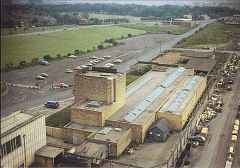
- AND PART OF WORKSHOPS COMPOUND-NOFIRESTATIONTHEN! BigLoada :- I cannot see tye Ventora in the car park. Was it there? high pit wilma :- Sure thing! It would have been doon in that little area at the dorty end o' thi pit baths..hidden from view by the buildings.[see note]. hoggy03 :- Hi Bill, when was this shot taken? i would say it was late in the day with only a few cars in the car park and the "trusty steed" parked up he,he,he. but i don't know. high pit wilma :- Hi hoggy,all the surface pics up from the wheels were taken about 7-0pm,after the gaffers had all gone home![ Give or take a haaf-hoor or two!] Jilly2k2 :- Love all these pictures! high pit wilma :-Thanks Jilly,i'm really pleased i had the foresight to take a camera down.before the pit was closed,and lost forever. -
 Dr. Drewboy :- i have never heared of 6-legged roof-supports but in germany it was the same with the investments... the miners said "when your mine get's new showers/headgears/whatever it will be closed next year."! germany's biggest headgear in "göttelborn" never really extracted coal. or "schlägel & eisen" shaft 4 got a modern, 70m high headstock which just was in use from 1986 to 1990 and the new coal blending bed was finished in 1987 and also worked until 1990... high pit wilma :- Hi Dr Drewboy! Yeah,in the 1960's,when we first got mechanisation,we had Dowty 5-legged chocks,with adjacent,and full 6-batch control.[that was after using Dowty hydraulic props and face bars..!]. Then we got Gullick 6-legged chocks [4 legs at the back,and 2 at the front,supporting the canopy.Each leg could withstand 100 tons roof pressure,so each face chock was referred to as a "600-ton face chock". Problem was,the goaf used to push the legs forward,and cause the roof to fall,flattening the chocks to the ground,like squashing a beetle,the roof pressure in the 3/4 seam was so great. We got a new design of chock called the "Rev-lem",which had huge,thick armoured bracing plates,at each side,like grasshopper legs,which allowed vertical movement of the chock canopy,but which also prevented lateral movement,so the canopy couldn't be pushed forward by the goaf falling in. One coal face alone,installed with these chocks,made Bates Pit profitable,but when we asked for more,the area director refused us them,and sent us the old style Gullicks,which he,and everybody else, knew,was a risk of human life,to work under. As a result,thatcher,our prime minister,made the excuse we were unprofitable,and closed the pit. It was all contrived from the start,cos she knew,and she actually said it,that if she could break the Miners,she could break the T.U.C,our trade union movement....and she DID!
 -
From the album: Bates Pit by High Pit Wilma
high pit wilma :- .....AND HERE'S THE PROOF OF MY COMMENTS ABOUT THE "BOG-STANDARD" INFERIOR GEAR WE WERE SUPPLIED WITH..,ON A PREVIOUS PIC. STUDY THIS ONE ON FULL SCREEN,AND CHECK OUT THE ROWS OF BOG-STANDARD 6-LEGGED CHOCKS,ON THE LEFT OF THE PIC.[NO BRACING ON THESE ONES...] WHEN BATES WENT THROUGH THE "COLLIERY REVIEW PROCEDURE", THE MANAGEMENT,ON ORDERS FROM ARCHIBOLD [THE AREA DIRECTOR],SHOVED £3O MILLION DOSCO ROADHEADERS,FULL SETS OF FACE CHOCKS[THESE ONES ON THE PIC,]THOUSANDS OF YARDS OF 42" CONVEYOR BELT ON HUGE ROLLS,SHEARERS,AND LOADS OF OTHER MACHINERY,DOWN THE PIT AND SIDING'D IT OFF,NEVER TO BE USED. THE REASON?WHEN THIS STUFF LIES IN THE SURFACE COMPOUND,IT IS PAID FOR FROM THE "PLANT POOL",AT AREA WORKSHOPS. THE MINUTE IT GOES IN THE CAGE TO GO UNDERGROUND,IT HAS TO BE PAID OUT OF THE COLLIERY MANAGER'S BUDGET. BY NOT BEING USED,IT BECOMES A MASSIVE FINANCIAL LOSS TO THE COLLIERY,AND SUPPORTS THE GOVERNMENTS ARGUMENT ,THAT THE COLLIERY IS "UNECONOMICAL",AND NEEDS TO BE CLOSED. THIS IS FACT...!! YOU SEE,GOVERNMENTS GET AWAY WITH BEING BENT,AND CORRUPT,BECAUSE IT IS THEIR PEROGATIVE TO DO SO...!!! I REST MY CASE.............! high pit wilma :- OH!...ER...I FORGOT,WHEN BATES CLOSED, MY MARRA'S AND ME WENT TO ASHINGTON PIT,IN1986. WALKING UP THE TIMBER YARD ONE DAY,WHAT DO YOU THINK I SAW?........ TWO COMPLETE £30MILLION DOSCO ROADHEADERS,LOADED ONTO TRAMS,WAITING TO GO DOWN THE PIT. AND YOU KNOW WHAT WAS CHALKED ALL OVER THEM...? "3/4 DRIFT,BATES COLLIERY"....[THE SAME ONES...THEY BROUGHT THEM OUT AND TOOK THEM TO ASHINGTON PIT,AFTER THE DIRTY WORK WAS DONE AT BATES], AND YOU KNOW WHERE THEY WENT....? DOWN INTO AN OLD DISUSED SIDING WHERE THEY ARE STILL THERE YET....NEVER USED.......! AND YOU KNOW WHY THEY DID THAT...? COS MAGGIE THATCHER STILL HAD A FEW NAILS LEFT,AND ONE HAD ASHINGTON COLLIERY WRITTEN ALL OVER IT. MR BUDGE TAKES OVER THE REST OF THE SAGA WITH ELLINGTON...HIM AND MAGGIE ENJOYED BANGING AWAY THE LAST FEW NAILS THERE..... -
From the album: Bates Pit by High Pit Wilma
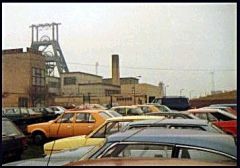
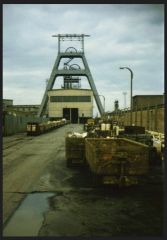
high pit wilma :- Coal winding shaft headgear,and surface buildings [1986] -months before the pit closed. frazerweb PRO :- What I love about this headgear is it features on Get Carter at the end of the film, with the chase on the Blyth staithes. high pit wilma :- Hi! Yeah, i was pleased to capture the staithes on one or two of my other shots,as they were reduced in height,down to just above the high water mark,a few years ago. -
From the album: Bates Pit by High Pit Wilma
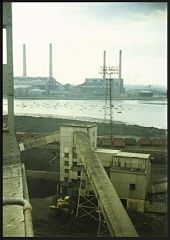
high pit wilma :- Seen from up the platform around the cage pulley wheels,in 1986............ Today,in 2nd of November, 2010,i have just seen a press photo of councillors,and children from a Blyth primary school,standing on this site,which has taken nearly a year to de-contaminate,and prepare 26 acres of land,on which to build a new primary school for Blyth schoolchildren....what a change of use....!! high pit wilma :- Update.....6-12-10, building work has started,and is well under way,for the new school,next to the pit shafts,and the river bank sides,just hope that the school staff don't go to sleep...for a second............... Not forgetting the fatalities which occurred at Widdrington old pithead baths,which had been converted to an industrial site,a few years ago,where deadly "blackdamp" [carbon dioxide] mine gas seeped through breaks in the strata,and filled up a basement in the building, killing some of the occupants. Just hope our clever planning dept has kept this sort of danger in mind,when building on abandoned mine-sites.....like Bates pit. -
From the album: Bates Pit by High Pit Wilma
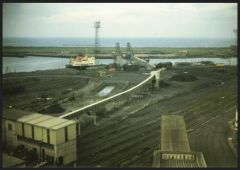
aj.gardner :- The loading gear at the berth is still standing (Feb 2011). Is it being used for loading some other cargo now? high pit wilma :- Hi aj.! I'm not sure if they still send opencast coal to the power stations down south,they used to send coal from Ellington pit blended with other coal,to get the right sulphur/ash content,but now that Ellington's gone,i must admit,i haven't taken a great deal of notice,even though i'm down there,[on the cambois side],quite often! Good point,i'll try to find out and post any info up soon as i can. Cheers aj.,thanks for the visit! hoggy03 :- Hi Bill and aj, the shipping plant is still in use to this day (28/02/2011) but does not ship any coal now, only grain and glass to the best of me and my dads knowledge, i dont know where to though most likely the south but im not 100% sure. hoggy03 :- Hi Bill and Aj, i found the shipping plant is still in use but it ships glass and plastics not grain as i said before and it is shipped to Europe. -
From the album: Bates Pit by High Pit Wilma
-
From the album: Bates Pit by High Pit Wilma
Dan :- Wilma, are they called Headgear's or Headframes? high pit wilma :- They are called "Headgears",here in Northumberland,England,U.K. Cheers,mate! -
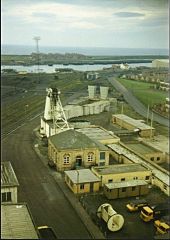
From the album: Bates Pit by High Pit Wilma
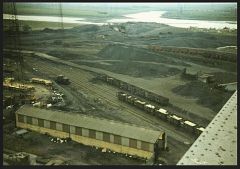
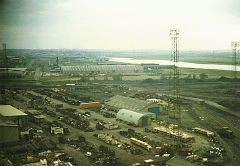
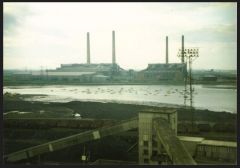
high pit wilma :- NORTH BLYTH TERRACES in the background..note the mine car tippler standing next to the coal wagons....the white object-round- with an entrance way. The fan ducting runs from the shaft headgear ,over to the fan house,the twin funnels completing the scene. -
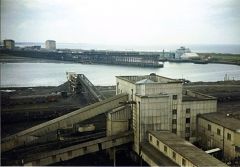
From the album: Bates Pit by High Pit Wilma
high pit wilma .......also the Alcan berth is further along , near the start of Cambois pier. Ironically,the coal staiths came down,the Ridley Arms pub, Bolco's shipbreakers,and we now have a brand new coal unloading facility,with ships coming from China etc, with coal for the Alcan power station!!....Coals to Newcastle?????? [along from where Bolco's used to be. ] -
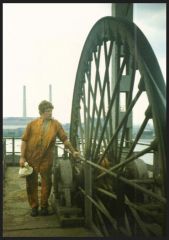
From the album: Bates Pit by High Pit Wilma
-
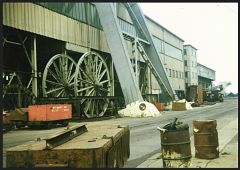 hoggy03 asked :- Hi Bill, Did the NCB have spares for everything or just a select few things that would be needed ASAP, if they where damaged or broken for the pit to work. high pit wilma reply :- Hi Hoggy! Most spares that were considered essential,were kept,and that, was a lot of spares!! On one aerial photo,i have put notes on,and you can see a complete face installation of hydraulic face chocks,stacked in double rows,which would have cost a million pounds back then......then then there was spare shearers,Dosco Roadheaders [costing £30 million each!].....pumps,conveyor belt driveheads,and structure.....etc etc...! A lot of that stuff was sent down the pit and never used,just to put the costs onto the colliery Manager's budget,and so deeming the pit to be uneconomical.....cos as long as it stood in the pit yard,it was costed to the area plant pool..,but the minute it was put into the cage to go down,the Manager had to account for it. I was talking to a Welsh ex-miner at Beamish museum,a few days ago,same age as me,and he said they did the same thing in all the pits down there,one by one,to deem them "uneconomical",as an excuse to close them. He said they left hundreds of thousands of pounds worth of machinery down there....... .....and he isn't the only one who has told me tales like the ones we already know! Cheers,Hoggy!
 -
From the album: Bates Pit by High Pit Wilma
EXPLOSIVES CAR IN FOREGROUND - SPARE CAGE WHEELS IN THE REAR. -
From the album: Bates Pit by High Pit Wilma
Aye it was a good job i had the foresight ask a good marra to take me up the wheels,or we wouldn't have the pleasure of these memories. -
Cheers Andy - just waiting to see what HPW would like - an Album or everything in this Coal Mining topic.
-
Andy - if I was to create an Album of HPWs photos of Bates pit would there be a restriction on the amount of space available? HPW has 40 photos on his Flickr page and my estimate would be that the album would require approximately 10MB to take all the photos. I have currently extracted (no simple download or copy image available on the Flickr page) 28 images and made them jpg files and those 28 = 4.63 MB (4,864,549 bytes) on my PC. As you would expect HPW has a comment with every photo posted on his Flickr page and I would estimate that the average number of characters added into the 'Description' of each photo posted to be 180. If HPW wants this created for him would there be a problem or could I just go ahead and say create an Album in 'Places' or '..and the rest' gallery?
-
Is the 'Shop' tab/link available to non members visiting the site? Should the 'Shop' link be posted on social media, facebook, for Bedlington residents and expats to see?
-
No mention on the web site :- http://www.bedlingtonterriersfc.com/club-information/players-staff/ The last newspaper story that Google finds, with Mr Rich, is :- http://www.chroniclelive.co.uk/news/local-news/bedlington-terriers-fc-facing-winding-up-1352784

