stevenmcvey963
Members
-
Joined
-
Last visited
Everything posted by stevenmcvey963
-
Cheers lads It'll be great to talk about the "old" days in Bedlington,a great place with no steel shutters or boarded up windows on the front street and best of all some lovely people and characters,It's amazing how a place can get into your bones and sole,anyway hope to chat to you all soon,wocheer
-
just found this site wanted to say Hi,I was born in Bedlington Hartlansds,1959 and left 1983,if you were around then and are in or around my age I'll know you,specially if you're a bottom ender,btw Millbank,if you know the Chivers family we might know each other as I was good mates with Les or Chips as he was known,new Brian but he was older than me.
-
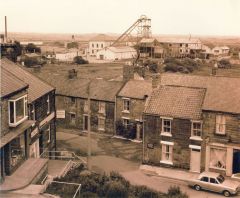 yep you're right,got my first bike from there,you could get anything from a bike to a bed or a lawnmower if you like,brilliant.
 -
oh yeah I can just about remember that did it get taken over by the big department store when it opened?
-
ha ha yeah that's right,I was kicking around there between 1972 and about 1980 how about you mate
-
 the council still employing their high standard of tradesmen then
 -
can't ever remember an upstairs just a few tables by the counter and a sixpenny fruit machine then at the back of the shop the machine where you had to get 3,4 or five numbers in a line and if you got 20 points Peter or Fred would give you 10 bob,happy days
-
just out of shot at the front of the car is Baccis,Peter and Fred the 2 brothers ran the little cafe for years used to go in there as soon as I got any pocket money,change it into "tanners" and play the famous "machine" brilliant
-
I remember him being pulled down the street by his dog ,also if he came out to see you his hands were always freezing,a nice man though,old school gent
-
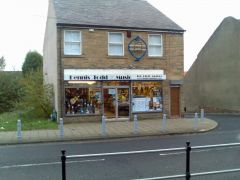 the shop you see was Coopers prize bingo and the door to the right led to an upstairs pool room ran by their son,the road to the right must be pretty new I was around in the 1970s and was often to be found hanging round there with my girlfriend Susan and mates,Alan Fox,Bob Tweedy,Stephen and Michael Charlton Paul (tuc) Fennell and loads more,they were good times then I left in 1983 but always remember the Bedlington that made me.