


Contributor Leaderboard
-

Andy Millne
Administrators3Points3,465Posts -
James
Members1Points213Posts -
Malcolm Robinson
Moderators1Points6,416Posts -
.jpg.cdd7f8371d17e2f2f2e2a0e21e02f727.jpg) 1Points3,654Posts
1Points3,654Posts



.thumb.jpg.7493ddab4a696108cf2b849323d3c155.jpg)
Popular Content
Showing content with the highest reputation on 11/02/21 in all areas
-
Incidentally storing all your passwords in plain text in a spreadsheet is a very bad idea. 😉 What you need is a password manager such as LastPass or 1password. Next best is your os/browser password manager (what you are doing when you opt to save usernames and passwords after logging in). The difference between this and a spreadsheet is the passwords are stored encrypted protected by your primary password. https://www.getsafeonline.org/protecting-yourself/passwords/2 points
-
1 pointWell the good news is that an application for The River Blyth estuary to become a Freeport has been submitted. This once again opens up a whole new range of opportunities for Bedlington, as well as other places of course, but with so many possibilities on our side of the River this could well be another game changer for us. Can wait until we see Puerto Del Bedlington.
 1 point
 -
... but it's close, so I'll let you have a point.
 1 point
 -
It sounds like your browser is automatically deleting cookies when you close it. The “remember me” functionality on websites relies on cookies being allowed to persist between sessions. If the login cookie is deleted you get logged out. which browser are you using? It could be the browser settings themselves or an extension.1 point
-
1 point
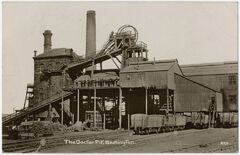 Dr Pit in 1912 with the surface workers posing for the photo. Note the guy on top of the headgear next to the “pulley wheels”. This old winder house was for the steam driven winder and was replaced with the electric winder in 1921. So there was loss in production, the new winder house was built behind the old one and the electric winder commissioned. The pulley ropes from the old winder were then passed through to the new winder to the electric winder and the old winder house with its chimney was demolished. (Information taken from James Tuck’s book “The Collieries of Northumberland”) We know that any photo of the Dr Pit showing the white brick built winder house was taken after 1921.1 point