Contributor Leaderboard
-
John S Smith
New Members2Points21Posts -
1Points6,990Posts


Popular Content
Showing content with the highest reputation on 14/02/24 in all areas
-
@John S Smith I see you add a couple of comments on the 'Historical Timeline of Bedlington' under the 'Info' heading at the top of the Home page. The Timeline is an interesting list of the significant events that have happened throughout Bedlington's history. There is an MS Word Timeline document that was created by @johndawsonjune1955 and @Andy Millne added that document and additional info info the 'Historical Timeline of Bedlington' within this group that Andy is the Admin of. There are many different discussions that have been created under the 'Discussion' section and it is worth a look at. One of the best ways to find topis that already have been posted, and numerous comments added, is to input an word or phrase (the pharse should be surrounded by quotation marks "-----") into the search box at the top right hand corner of the Home page and most other pages. Enter your search and you will get a list of all the topis that have the word or phrase you are looking for. Hope that helps but if you have any questions then just just raise it in under the Discussion heading in the 'Chat Central' section and you should get an answer1 point
-
1 point
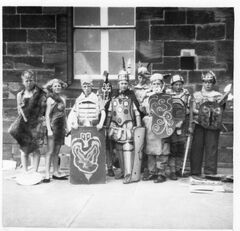 !. is I think ? Dodds and 2. I am not sure of. 3 George Grahame 4 Martin ? 6. John S Smith. 6. Brian Richmond, 7. ? Cross, 8. I think it is ? Turner, 9 ? I have forgotten. hope this little helps.1 point
 -
1 point