



Blank
-
Joined
-
Last visited
Everything posted by Blank
-
Welcome to the site Canny Lass! Please check your private messages as I've sent some info through
-

From the album: Bedlington Miners Picnic 1950s (Bigger Photos)
The Northumberland Miners' Picnic, with the Bedlington Doctor Pit banner paraded. -
-
1955 Dr Pit Banner
-
 1955 Miners Picnic Blyth Banner
-
 1954 Ice cream Van
-
 1954 Front Street, Bedlington
-
 1953 Coronation Shelter Unveiling
-
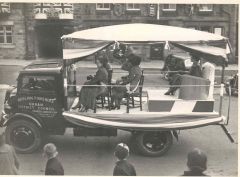 1953 Beauty Queens At Miners Picnic
-
 1952 Brass Band Miners Picnic
-
 1952 Brass Band, Miners Picnic
-
 1950 Speech At Atlee Park Miners Picnic
-
 1950 Men holding Dr. Pit Banner Miners Picnic
-
 1950 Procession through Front Street Miners Picnic
-
 1950 Coal Queens At The Miners Picnic
-
 1950 Brass Band Miners Picnic
-
 Miners Picnic 1950 Atlee Park
-
 Large crowd atlee park 1950
-
 Float At Miners Picnic 1950
-
 1950 Crowd Outside The Black Bull
-
 1954 Ice cream Van - Miners Picnic
-
 1952 Brass Band - Miners Picnic
-
 1950 Speech at Atlee Park - Miners Picnic
-
-
From the album: Bedlington Miners Picnic 1950s (Bigger Photos)
Photograph of the Northumberland Miners Picnic at Bedlington in 1955. Men and women sit infront of the Blyth NUM banner. Brass instruments are visible on the ground beside the banner. -
From the album: Bedlington Miners Picnic 1950s (Bigger Photos)
Queue of people waiting at an icecream van, Miners' Picnic at Bedlington. 1954 -
From the album: Bedlington Miners Picnic 1950s (Bigger Photos)
Elizabeth Storey as Miss West Sleekburn, standing in Bedlington High Street during the 1954 Miner's Picnic. -
From the album: Bedlington Miners Picnic 1950s (Bigger Photos)
Miss Bedlingtonshire Beauty Queen and other beauty queens at an unveiling the 'Coronation Shelter' on Monday 1st June 1953. Pictured left to right: Mildred Gibson, Miss Choppington; Noreen Sadler, Miss Netherton; Mary Dunn, Miss Bedlington; Councillor James H. Parr, Chairman of Bedlington Urban District Council; Councillor W. Holliday; Councillor J. Phillips; Gillian McNair, Miss Stakeford and Edna Main, Miss Sleekburn (Bedlington Station). -
From the album: Bedlington Miners Picnic 1950s (Bigger Photos)
Photograph of the Beauty Queens in the beauty queen lorry at the Northumberland Miners' Picnic at Bedlington, Northumberland in 1953. -
From the album: Bedlington Miners Picnic 1950s (Bigger Photos)
Procession marching through Bedlington Front Street, showing the NUM Dr Pit Branch Banner. 1952 -
From the album: Bedlington Miners Picnic 1950s (Bigger Photos)
Brass band marching through Bedlington Front Street. 1952. Crowds line both sides of the street. Brass band marches down the main road -
From the album: Bedlington Miners Picnic 1950s (Bigger Photos)
Crowds fill Atlee Park. Unidentified men and women are seated on a raised platform in the park listening to an unidentified women making a speech. Bedlington is visible in the background. -
From the album: Bedlington Miners Picnic 1950s (Bigger Photos)
Unidentified men holding the NUM Bedlington Dr. Pit Branch Banner. nd. [c.1950] -
From the album: Bedlington Miners Picnic 1950s (Bigger Photos)
Procession of people and brass band marching through Bedlington Front Street. [c.1950] -
From the album: Bedlington Miners Picnic 1950s (Bigger Photos)
Float containing Coal Queens, Miners Picnic. [c.1950] -
From the album: Bedlington Miners Picnic 1950s (Bigger Photos)
Crowds watching a brass band procession through Bedlington Front Street. [c.1950] -
From the album: Bedlington Miners Picnic 1950s (Bigger Photos)
A crowd of people ennjoying the picnic at Atlee park, Bedlington. -
From the album: Bedlington Miners Picnic 1950s (Bigger Photos)
A large crowd sitting on the grass in Atlee Park, Bedlington. [c.1950] -
From the album: Bedlington Miners Picnic 1950s (Bigger Photos)
A float at the Northumberland Miners' Picnic at Bedlington. nd. [c.1950] -
From the album: Bedlington Miners Picnic 1950s (Bigger Photos)
Crowd outside the Black Bull Hotel, Bedlington [c.1950] -
Hi Alanc, the last time I visited St Cuthbert's was at the end of last year and the grounds were under a lot of snow so didn't notice much. What kind of a state are they in?
-
There used to be some funny stuff on the Fast Show, wonder what made them come to Ashington? That must have been filmed in the 90s, judging by the way people are dressed...
-
But Bedlington doesn't have a chance against Morpeth, or worse - Blyth
-
Anns Pantry is on Allgood Terrace. The shop on Millbank Road was Frazers the last time it was open - but it hasnt been a shop for at least 8 years now. Frazers on Millbank Road
-
-
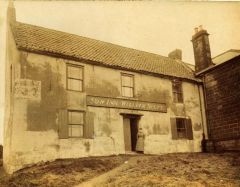 Hasn't changed much