Contributor Leaderboard
-
3Points6,990Posts
-

Andy Millne
Administrators1Points3,465Posts -
.jpg.cdd7f8371d17e2f2f2e2a0e21e02f727.jpg) 1Points3,654Posts
1Points3,654Posts


.thumb.jpg.7493ddab4a696108cf2b849323d3c155.jpg)
Popular Content
Showing content with the highest reputation on 19/09/21 in all areas
-
Entry under History in Wikipedia states :- 'It was founded in 1926 as Bedlington Secondary School for the areas of Bedlingtonshire, Ashington and Newbiggin, being built next to Bedlington railway station. Subsequently it became Bedlington Grammar School, before turning comprehensive in 1974. It gained Maths and Computing College status in 2009. I would add - the Secondary Modern School merged with the Grammar School to create the High School. The new build + the old grammar school remained until a new High School was built, on the existing grounds, and opened in 2016.
-
 1984 Lee Vallely Redshaw BHS.jpg
-
 1978c David Cochrane Bed High.jpg
-
 1993 - Nicola Downey.jpg
-
 IMG_0240_Original.jpg
-
 Sarah Ince.jpg
-
 1980-81.jpg
-
 1975-76 rugby squad.jpg
-
 1981 from Joe Waddle.jpg
-
 1986 Bed High Alan Smith.jpg
-
 Compilation of some of the facilities
-
 Official opening - 9th September 2016
-
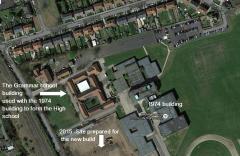 2015 aerial view
-
 Bedlingtonshire High School 2012
1 point -
-
Opened 1955 or 561 point
-
1 point
-
1 pointDelegating is not an easy task. Be proud that you are capable of assessing the situation and knowing: Who to delegate to How much to delegate to them When to delegate In which manner it should be done Where the delegating should take place Knowing why there is a need for delegation in just this instance ... and finally knowing how much of the task in hand you have some aversion to doing yourself. Truly a skill worth having. Having said that, I' love to donate a tree. That way, me and other ex-pats would have some 'physical' roots in the town. Maybe the keen gardeners who take such good care of keeping Bedlington in bloom with the hanging baskets etc wouldn't mind being delegated to/asked politely?1 point
-
1 point