Newbedders
Members
-
Joined
-
Last visited
-
Couldn’t drive then so it was the bus, and yes it was a long journey but worth it🙂
-
Took my future wife there on our first date, and I had to travel from Wallsend whereas she came from Bedlington.
-
A still photo every time I hit the webcam option.
-
Yes, I can view it on my iPad from abroad.
-
I use Findmypast and therefore have access to newspapers, and can access all of the years 1900-1949 for the Morpeth Herald
-
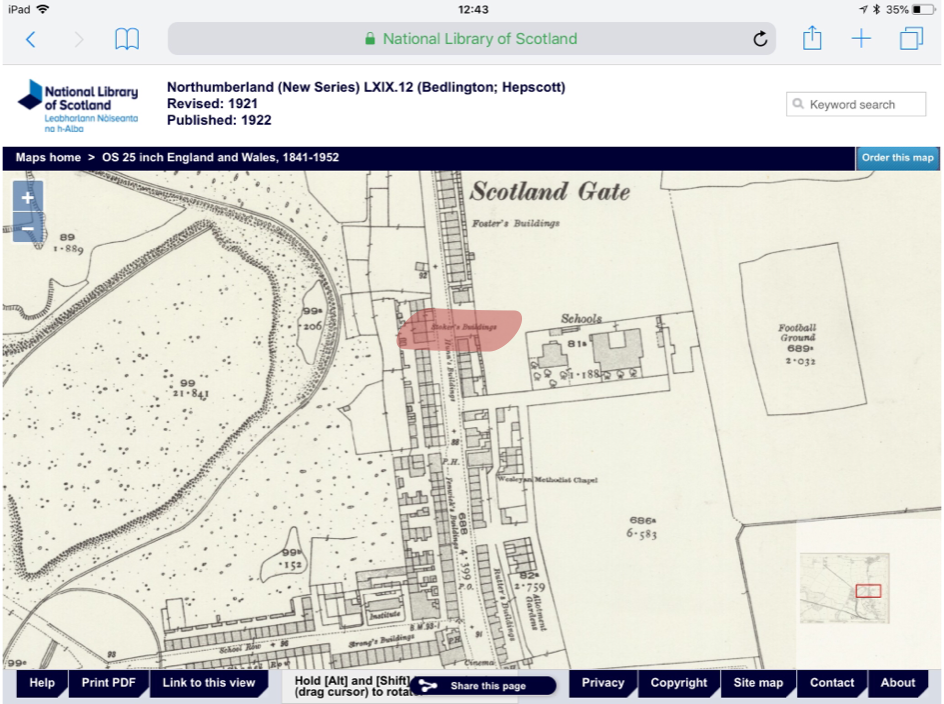
In researching a family tree I have come across relatives who lived in Carr’s Buildings, Scotland Gate, Choppington. In the 1911 census there is a family called Carr living in the same block as my relative. I have scoured old maps to no avail, although there are several groups of named buildings in the Choppington area.
-
Oh yes it is; but only static images.
-
Also frozen on my system
-
The map I’ve shown is the 25 inch version, recently introduced, and often gives more info compared to the 6 inch versions.
-
Won’t load on iPad SafariThe 1939 was a sort of census performed just before WW2 possibly prior to Identity cards being issued. Members of the McGlen family are actually listed within 3 relatively close addresses: St Cuthbert’s Tce, Millbank Cres and Beech Grove. However there are no results using St Cuthbert’s Crescent as the address.The 1939 register shows a McGlen family living at No 2 St Cuthbert’s Terrace. Obviously I don’t know if they are related to your subjects.The closure of Community Centres was also mentioned in another article.