



Cympil
Members
-
Joined
-
Last visited
Everything posted by Cympil
-
You`ve got it right there Monsta! `Compost delivered to your home in 25kg bags starts from £4.50 per bag (one to four bags); five to 20 bags costs £4.00 per bag and more than 20 bags costs £3.50 per bag. Loose compost comes at a minimum order of two tonnes costing £120. Alternatively residents can purchase and collect bags directly themselves from the Household Waste Recovery Centres for £3 per bag.` The cheek!
-
When i was there, security removed a couple of people from the audience for shouting `Fat B******` at him..considering that seems to be his favourite words you wouldn`t think it would upset him! That`s the last time i went to seem him
-
I can`t say i`ve heard of Fountain Hall but i`ve had a quick search on Google and the best site i`ve came up with that may help is Here Your link refers to.."That part of the Township of Bedlington from the first house in the west side of the half closes to the end of the Town on the same side. All the West end of the Town and from Fountain Hall on the North side of the Town to the Cross on the same side." The only references to any Halls in Bedlington what i can find are `A demesne house, or hall, of the Bishop of Durham is recorded in Bedlington, probably somewhere near the church.` (Church of St Cuthbert) So maybe the above link i gave might be of some help...Other than that, you could maybe pm Sw@lnalla, who is a member on here..he seems to know a bit about the history of Bedlington.
-
:lol: Canny paddling pool that.
-
I`ve seen Chubby Brown
-
Where are they doing that?
-
I`ve got Call of Duty 5, still getting a bit shooting practice before i go on live with it though, i`ll not last 2 minutes otherwise
-
-
Any news on who won the Bedlington league?
-
Very insulting!! They didn`t seperate the whites
-
I don`t know who`s right or wrong, but if i was in The Taverns position and a member of this forum, i`m sure i`d be saying something! He doesn`t have to go into detail, his business is his business after all, but if there`s someone slating him he should come on here and say his piece! Well that`s the way i would do it anyway.
-
Aye, and what`s more, i seem to remember a lovely cherry blossom tree that used to be there..they`ve howked that doon too Plus, it wasn`t 2 minutes since they spent god knows how much on that part of Bedlington with the useless steps and what not..now they`ve howked it all up. What a waste of money Eeeee mind..not impressed.
-
Although i wouldn`t hold my breath
-
From what i`ve been told, Ian (or someone from The Tavern) is a member of the forum..maybe they can clear things up a bit?
-
weyayeman Why isn`t he just posting as Mr Darn though?
-
:lol:
-
Or any Football game for that matter
-
-
Munchy Moos? Are they trying to say their cafe is full of greedy fat coo`s?
-
Which would it be, and would it be because you want to play it through for the first time again, or because it was really bad? One that springs to mind not so long ago was Guitar Hero Aerosmith, because it was BAD! Another one from years ago was Spy Vs Spy which was for the Nintendo i think. It was a load of rubbish. There was also a Home Alone game, which at the time i was quite excited about...turns out it lasted 20 minutes! The games i`d like to do again if i hadn`t already done them would be Doom! The graphics aren`t that good but the game-play is excellent..Plenty frights and beasties..pink grunters creeping up behind you and big green/black grunters that a partially invisible gnawing at you. Excellent
-
Cympil - is that your Vizsla or a stock photo? Stock photo..i haven`t even heard of a Vizsla never mind own one
-
I recognise the name `Jet-Set Willy` but i can`t say i remember the game..must have been a while ago?
-
Hope you have a great birthday
-
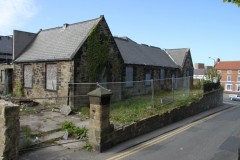 The inquiry over the future of the old Bedlington Infants School buildings at the junction of the Market Place with Church Lane has been adjourned almost as soon as it commenced. Held on Tuesday 12th May and originally expected to last for three days. it has now been determined that new inquiry dates will be scheduled in September. Details will be published here on www.bedlington.co.uk The former Bedlington Infants School was used as a church hall for some years before an unsafe floor caused its complete abandonment. Since then it has fallen prey to vandals, and is generally regarded as an eyesore in desperate need of suitable redevelopment.
 -
Happy belated Birthday! Sounds like you had a nice time

