

Everything posted by Alan Edgar (Eggy1948)
-
-
-
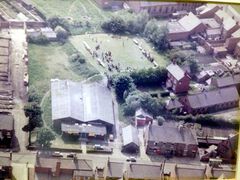
We did kick-a-bout on it but never knew what it was originally used for. because of the size we though bowling green. Here are three members from c1965, but not easily recognised from the photo😱 that was taken by Dave Hamilton.
-
Noo o apgze kneeded aboot yur spellin, that' was just my sense of humour referencing Liza Minnellie's song
-
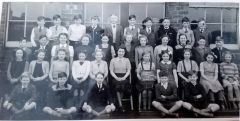 Comment from Cambois Facebook member - Margaret MetcalfeThis is my class photo which I missed as I was ill totally gutted not on it. No.36 is Keith Smith not Watson and 34 Is John Jobson.
-
 Photo from Sandra Spratt - names from Sandra - Terry Haley - Sandra Blyth & Jacqueline Turnbull.
-
From the album: Cambois Infant / Junior School
-
 No 15 updated from Ken to Tom Jones. It's not unusual for me to get a name wrong
-
@Jammy - I can't remember any events - games etc (1960 to 1968) been held on the cut grassed area at the back when I was a member c1962 to 1968. Some of the Bedlington Facebook members remember there were dog shows; and jumble sales. I do remember cutting through, from between the scouts building and Waverley Drive, into the YMCA field and I am sure there was a slaughter house/yard between the back of the scouts building and the YMCA field. Can't remember who I went with but it would probably a relative of the slaughter man as we were shown around and got to hold the gun he used to kill the cattle.
-
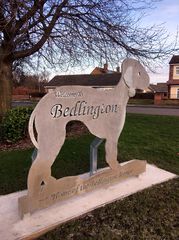 I think it was @Malcolm Robinson who took the photo without any clothing added and it was Simon Williams Bygone Bedlington Facebook group who took all the others.
-
On certain events in the year one resident, don'y know who, has added an additional feature to the dog. When the added feature has been noticed someone has taken a photo and posted it on social media.
-
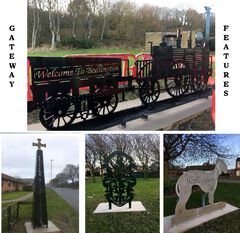
At the Southern entrance to the town is world renowned dog the Bedlington Terrier.
-
In 2017 four gateway features were chosen for their association with Bedlington. All are inextricably linked either by their commercial, religious or social heritage to the town. They have all been placed at strategic points to give anyone coming into the town by car or bus the maximum view point and all carry the adage "Welcome to Bedlington".
-
From the album: Bedlington Gateway Features
-
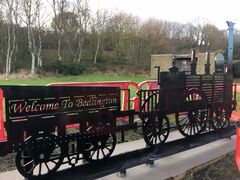 At the Northern entrance to the town is a scale replica of the first steam train in Holland, the Arend, which was built in Bedlington.
-
From the album: Bedlington Gateway Features
-
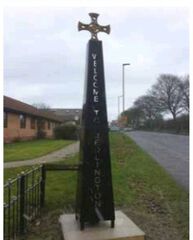 At the Northern entrance to the town is a St Cuthbert's Cross denoting the significance Bedlington played in the St Cuthbert story.
-
From the album: Bedlington Gateway Features
-
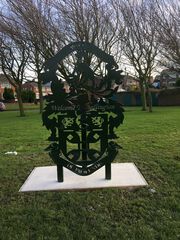 At the Western entrance to the town is the Bedlington coat of arms that was unearthed by the Bedlingtonshire Development Trust.
-
From the album: Bedlington Gateway Features
-
From the album: Bedlington Gateway Features
-
Initiative test to London YMCA and back organised by the Bedlington YMCA Youth Leader John Bygate - c1965.
-
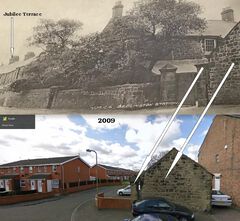 Postcard and opening programme - Oct 11th 1919 - posted by Edith Barrett on the Bygone Bedlington group.
-
From the album: Old Photos of Bedlington 2
-
Posted on the Bygone Bedlington group by Edith Barrett - official opening ceremony Wednesday July 26th 1961.