



Everything posted by Alan Edgar (Eggy1948)
-
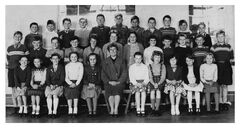 @Alan Maguire - names updated. i'll post the photo on the Bygone Bedlington group for the lad, David Twist, who posted it and let him know he got your Colin's grey cells active
 -
No 2 - possible name
-
@Alan Maguire - your Colin's list of names added to the photo.
-
-
Photo from David twist - Bygone Bedlington Facebook group. Names from David, Isobel Jones and Sheila Parr.
-
From the album: St. Bede's Primary & Senior School
-
-
Same Sunday paper my man and dad had delivered in the 1950's and 60's - Sunday Post. Now the weekly newspaper that I can remember from the same period, delivered on a Thursday, I think was called the Weekly News. Can't remember a Blyth News,b ut that's nothing unusual for me these days. Jacquie, following on from her mam, still buys her 3 cousins (aged between 59 and 64) the Oor Wullie or Broons annual every xmas. Wouldn't surprise me if new annuals started - The Windsors& Oor Harry
-
I will make the effort to switch off when the daily TV evening news is on during this 'phone-hacking trial'. The last time I would have bought a newspaper would have been May 1990. Working in London, from 1987 to 1990, I started buying the Daily Express, not to read 'news' stories, to block out all the commuters on my daily underground tube journey into work. It was just to turn to the puzzle page after having a chuckle at reading the Calvin & Hobbs cartoon strip. As I came home every Friday I had to but the Express on the Saturday to see how the weekly adventure of Calvin & Hobbs ended. There were a team of technical authors on the project I was working on and they had started calling inn every week day to read Calvin & Hobbs. So I started keeping the five week days cartoon strip away fro the authors and took Saturdays newspaper to London with me the following week. Then cut out the six cartoon strips, photocopied them all onto an A4 sheet and left the A4 sheet in the kitchen area where everyone went to make a cuppa. So prior to going to work in London in 1987, having left school in 1965, I probably only bought half a dozen newspapers in those 22 years and I haven't bought one since 1990.
-
He needs to find himself a job. Perhaps if he had of stayed with the Royals he would have something to do rather than reading daily newspapers
-
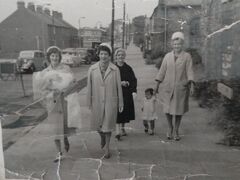 @jfk members of the Choppington Remembered group named a few of the buildings in your photo so I added your photo to a shot of the 2021 Google street view - 'Then & Now' image :- One member, David Tait, thought he recognised a couple of them in your photo :-
 -
Thanks jfk. Have you thought about creating an album - Choppington - under the Gallery>Places Gallery?
-
@jfk had a go at removing some of the damage from your photo. Ok if I share your photo on the Facebook group - Choppinton Remembered for Brian Jenkinson, who is Admin of the group, to see?
-
-
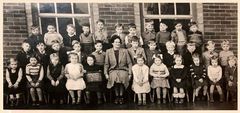 Kathleen Hedley - Bygone Bedlington Facebook group says No 11 David Robertson.
 -
Is that Richardsons Buildings on the left of your photo?
-
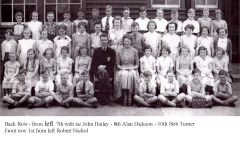 @Alan dickson says there was no Blanch Butchart in his year and it is definitely Una Tiffin.
 -
@jfk - is this Bedlington? I can't place that road
-
until
TOM JONES TRIBUTE £5 FRI 13TH OCT -
until
SILENT DISCO 8TH JULY £10 -
until
-
 Beatty Road - June 1953 - can't remember anything about it or the outfits my brother Dennis and I were wearing
 -
Update from Elizabeth Armstrong, Bygone Bedlington group, who said :- 'number 36 is not Una Tiffin but my sister Blanche Butchart xx'
-
until
https://www.facebook.com/profile.php?id=100083572540183 -
until

