Mr Darn
Members
-
Joined
-
Last visited
Everything posted by Mr Darn
-
starting at the wharton probably, then i'll play it by ear, it depends who turns up.
-
no, he should have been stripped and sacked.
-
a good night had by all, my closest friends all made an effort, and those that couldnt, mr ord!, had an excuse and will be there friday! anyone wanna see a mr darn pissed? be in bedlingtoon on friday!
-
Why Thankyou! just on my way out to get customarily slaughtered! hope work dont mind me going in with a hangover tomorrow! lol
-
getting back to another point i made before, this is my row-boat:
-
i take it no 'burning off' ceremony was preformed before the first cooking session then Hope your feeling better now, even if 'er indoors is giving you a headache!
-
i had heard romours too... what do you know? i was involved in the project at the very start, fitting the new windows to some of the units. apparently the plan has changed focus since them days.....
-
not sure where the pit was, so heres a handy link multimap.com and zoomed in: multimap.com theres a zoom function there to get your barings with
-
yeah, its a lake less than 10 years old, or there abouts, part of a green site, full of eco-friendly buildings. this is their website.
-
32ft by 9ft. its a project me and my father took from a guy about 5 years ago, as my dad is boat mad! i have a pic somewhere... by lakes i mean the likes of fontburn, etc. although i have not tried the lake localy at QEII at Ashington, nor the more local one at boumersund.... the name of which escapes me right now. i like it at fontburn, its a nice day out. i have had the odd night down the end of south pier at blyth tho. some good sized flatties down there if you cast into the bay....
-
i go sea fishing, but not from shore, i have my own pleasure boat. if i do fish from land its lakes...
-
Happy birthday bud, have a good day...
-
Happy Birthday Ms Hair.may you have many more!
-
anyone care to elaborate on the 'other pubs that i missed?' market club is doing well!
-
I personally like alcohol.... ...without it i'd probably still be a virgin!
-
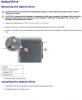
just to be even more thorough... you dont mention the laptop model but i see it is a dell. as an example of the ease, heres the instructions for an inspiron 2200 (i believe). the picture has been reduced in size and quality. to view, click the bar at the top of the picture, and then click inside the picture that appears to enlarge it enough to read. its also here as an attachment if you want to download it for reference.
-
your a woman? wow! its matterless really, but with a heading like "A FEEL A BIT THICK BUT" i thought i'd best be thorough...
-
well, it certainly aint showing there! 2 reasons for that, 1, its knackered... (yes, its a technical term...) and needs replaced, 2, the driver needs reinstalled. if the drawer has been ripped off in the past, i would say it will need replaced. the good news is, dell spare parts are easy enough to come by, and its easily enough replaced. Just a case of knowing which screw to remove they start at about £5 depending on the model of the laptop. That online auction site that is in no way as good as Free Bedlington.co.uk Classifieds is a good place to start... If your getting someone to do it for you, this job should take no more than 30 minutes, so dont let them take your eyes out! Good luck!
-
this may just be because your trying to access the wrong section... try again using the steps above. if this does not work, try accessing the drive by double-clicking the E: and see if you can find a setup file that way. SETUP.exe is normally a good place to start, and is normally at the base of the disk's "tree". (first screen;) )
-
unfortunatly the drive you are accessing is the vista recovery drive, not the CDRom drive. it is not a physical harddrive, but a partition of your main harddrive you will know as your C:. this is a standard thing on microsoft vista, and is basically a copy of your windows setup at factory install to aid recovery of your system should it be required. this is a standard thing now, and is the reason you probably did not recieve an operating system disk with your laptop. if you access your 'computer' section (formerly "my computer" in previous windows versions), you will notice it looks off and on like this: C: being the main storage space and housing the operating system files, D: being the recovery section and your E: being your CDRom. try replacing D: in your setup procedure with E:. let me know how you get on
-
did you get it sorted?
-
you like that did you?
-
if your talking about the 'run' command box, its been omitted by default on vista. 3 ways to get it up that i know of (ooo-err matron!) 1, hold the "Windows" key and tap [R] once. release the "windows" key. the windows key looks like this: 2, hold [ctrl] and[alt] and press delete. choose to run the task manager, click 'file' in top left and then 'run...' 3, right click the taskbar (the bit at the bottom where your start orb (button) is) choose 'properties' click the 'start menu' tab scrool down and check the 'run command' box click apply the Run command should now be listed in your start menu. Hope that helps, if not, try and be a little more clear with your question
-
-